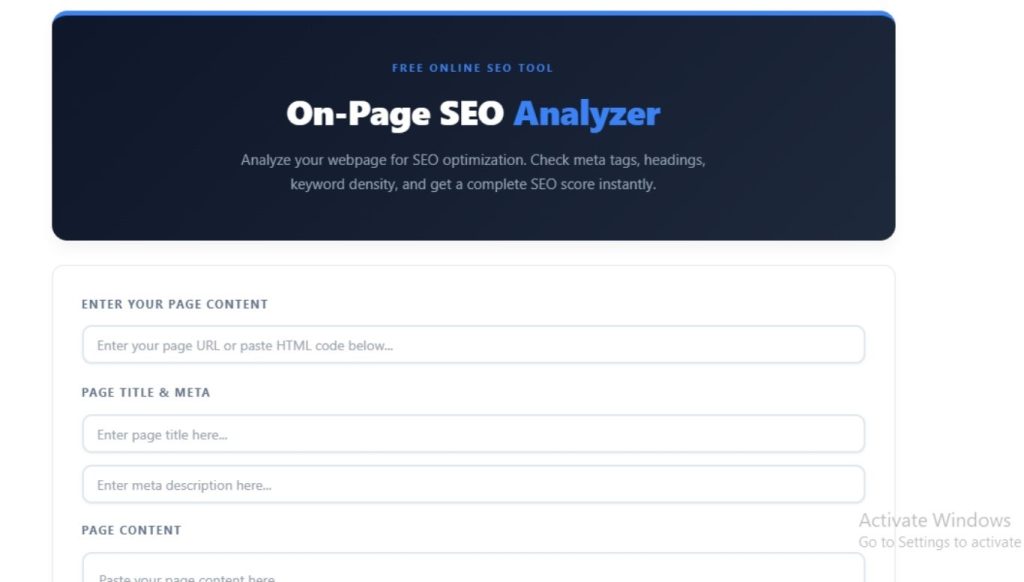
You can write great content and still rank poorly because of a meta description that runs too long or an H1 tag that never made it onto the page. On-page SEO is the layer search engines read before they even consider your content quality, and small mistakes here cost real rankings. Our free On-Page SEO Analyzer checks your title, meta description, headings, keyword density, and content length, then gives you a score and a clear list of fixes.
I work as an SEO professional, and I run every page through this exact check before I hand it off to a client or publish it on my own sites. This guide explains what the tool measures and how to act on each result, based on what actually moves rankings.
What Is an On-Page SEO Analyzer?
An on-page SEO analyzer is a tool that reviews the elements on a single webpage, your title tag, meta description, heading structure, keyword usage, and word count, then compares them against known best practices. It does not check off-page factors like backlinks. Instead, it focuses entirely on what you control directly inside the page itself.
You enter your page title, meta description, content, and primary keyword, and the tool returns an overall SEO score along with a breakdown of what is working and what needs fixing.
Why On-Page SEO Still Matters
Search engines need clear signals to understand what a page is about and who it serves. On-page elements give them exactly that. Here is why this layer carries so much weight:
- Your title and meta description directly shape your click-through rate in search results, even when your ranking position stays the same.
- A clean heading structure (H1, H2, H3) helps both Google and AI search tools parse your content hierarchy correctly.
- Keyword density that is too low signals weak relevance, while density that is too high looks like keyword stuffing and can hurt rankings.
- Thin content under 300 words rarely satisfies search intent and tends to underperform against longer, more complete pages.
- A well-structured page is easier for AI crawlers to extract and cite in AI Overviews and chatbot answers.
None of these factors guarantee a ranking on their own, but skipping them puts you at a disadvantage before your content even gets evaluated.
How to Use the On-Page SEO Analyzer
Running a full on-page check takes about a minute:
- Enter your page title and meta description in the input fields.
- Paste your full page content into the content box.
- Enter your primary keyword so the tool can calculate keyword density.
- Review your SEO Score, Title Length, description length, Word Count, H1 Tag count, and Keyword Density.
- Read through the “What’s Good” and “Needs Improvement” sections for specific fixes.
- Download your report if you need to share it with a writer or client.
Run this check before you publish, and again any time you update the title, meta description, or content significantly.
What the Tool Checks
| Element | What It Measures | Best Practice |
|---|---|---|
| Page Title | Character length and keyword presence | 30-60 characters, primary keyword included |
| Meta Description | Character length and relevance | 120-160 characters, keyword-rich and compelling |
| Content Length | Total word count | Minimum 300 words, ideally 300-2,500+ |
| Keyword Density | Frequency of primary keyword | 1-2% of total content |
| H1 Tags | Number and placement | Exactly one H1 per page |
| Overall SEO Score | Combined score from 15+ factors | 80-100 for a fully optimized page |
Understanding Your SEO Score
Your overall score reflects how well your page follows on-page best practices across every factor the tool checks.
| Score Range | Status | What It Means |
|---|---|---|
| 80-100 | Excellent | Your page meets on-page SEO best practices across the board |
| 60-79 | Good | Minor adjustments needed in one or two areas |
| 40-59 | Fair | Several elements need fixing before this page is competitive |
| Below 40 | Poor | Major on-page issues are likely limiting your visibility |
A low score does not always mean weak content. It often points to a single missing or misconfigured element, like a missing H1 tag or a title that runs too long.
Common On-Page SEO Mistakes and How to Fix Them
These are the issues I see most often when running this check on client pages:
Title too long or too short. Titles outside the 30-60 character range either get truncated in search results or fail to use the space effectively. Rewrite your title to fit within this range while keeping your primary keyword as close to the front as possible.
Missing or duplicate H1 tags. Every page needs exactly one H1 tag that states the main topic clearly. Multiple H1 tags confuse search engines about your page’s primary focus, while a missing H1 leaves your structure unclear.
Meta description too short or missing entirely. A meta description under 120 characters wastes valuable space in the search snippet. Write a compelling 120-160 character description that includes your keyword and gives searchers a reason to click.
Keyword density too low or too high. Density under 1% can signal weak topical relevance, while density over 2% risks looking like keyword stuffing. Use your primary keyword naturally throughout the page, focusing on the title, first paragraph, and a few subheadings.
Thin content. Pages under 300 words rarely rank well unless the search intent specifically calls for a short answer. Expand your content to fully answer the query, but avoid padding it with filler just to hit a word count.
Disorganized heading structure. Headings should flow logically from H1 to H2 to H3, mirroring an outline. Skipping levels or using headings inconsistently makes your content harder to scan for both readers and crawlers.
Frequently Asked Questions
What is a good on-page SEO score?
A score of 80 or higher generally means your page follows on-page SEO best practices across title tags, headings, content length, and keyword usage. Scores below 60 usually point to specific fixable issues rather than a fundamental content problem.
What is the ideal keyword density for SEO?
Most SEO professionals recommend a keyword density between 1% and 2% for your primary keyword. Density much higher than this can look like keyword stuffing, while density much lower may signal weak topical relevance to search engines.
How long should a meta title be?
Keep your title tag between 30 and 60 characters. Google’s display limit is based on pixel width rather than a strict character count, so titles within this range avoid getting cut off in most cases.
How many H1 tags should a page have?
A page should have exactly one H1 tag that represents the main topic of the page. Using multiple H1 tags or skipping the H1 entirely makes it harder for search engines to understand your page’s primary focus.
Does on-page SEO affect rankings on its own?
On-page SEO works alongside other factors like backlinks, page speed, and overall content quality. Strong on-page optimization will not guarantee a top ranking by itself, but weak on-page elements can hold back a page that would otherwise rank well.
What is the minimum word count for good SEO content?
Most pages perform better with at least 300 words, though the ideal length depends on search intent. Comprehensive guides and competitive keywords often need 1,500 words or more to fully cover the topic.
Final Thoughts
On-page SEO is the foundation that everything else builds on. You can have excellent backlinks and well-researched content, but a missing H1 tag or an oversized title still holds your page back from its full potential. I run this analyzer on every page before it goes live, because catching a misconfigured meta description takes thirty seconds and can directly improve click-through rate from search results. Paste your page details into the tool above, fix what it flags, and recheck until your score lands in the 80-100 range.