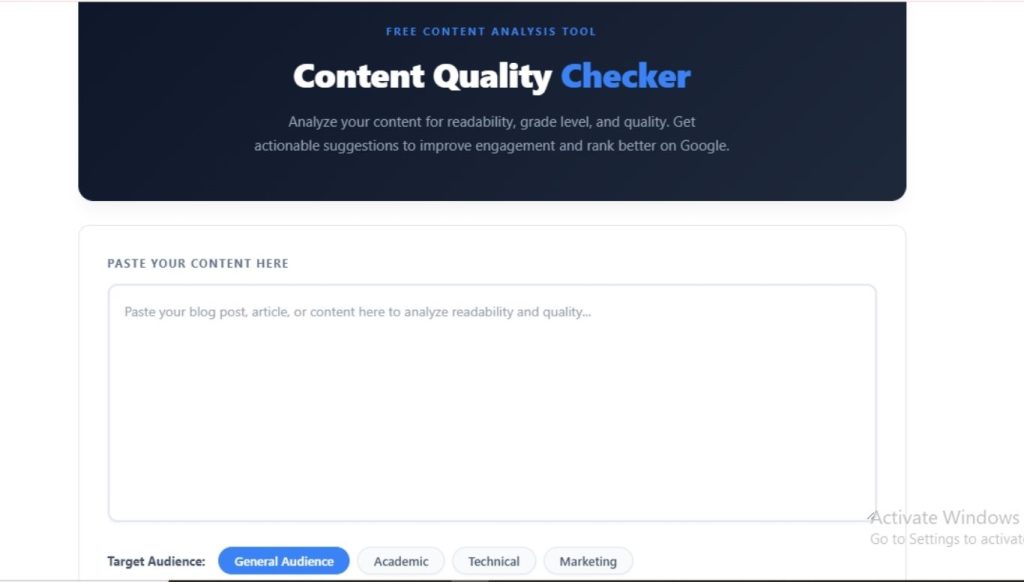
You can write content that covers every keyword and still lose readers in the first paragraph. Search engines reward pages that people actually finish reading, and readability is one of the clearest signals of that. Our free Content Quality Checker scores your writing on readability, grade level, sentence structure, and passive voice, then tells you exactly what to fix.
I work in SEO content production daily, and I run every article through this exact checker before it goes to a client or goes live on my own site. This guide walks you through what each score means and how to act on it, based on real testing rather than guesswork.
What Is a Content Quality Checker?
A content quality checker is a tool that analyzes your text and scores it against established readability formulas, mostly the Flesch Reading Ease scale and Flesch-Kincaid Grade Level. It looks at sentence length, word complexity, paragraph structure, and passive voice usage, then combines these into one overall quality score.
You paste your text, choose your target audience, and the tool returns a full breakdown along with specific recommendations. No login, no word limit headaches, and no waiting around for results.
Why Readability Affects Your SEO
Google does not use readability as a direct ranking factor, but it shapes nearly every signal Google does track. Wil Reynolds, founder of Seer Interactive, has pointed out that content depth and readability strongly influence whether AI chatbots cite a page at all. The connection works like this:
- Hard-to-read content drives up your bounce rate, since visitors leave before finishing the page.
- Low engagement and short time-on-page tell Google your content did not satisfy the search intent.
- Content that AI search tools and chatbots can parse easily gets cited more often in AI Overviews and answer engines.
- Clear writing earns more shares, comments, and backlinks, all of which support rankings indirectly.
The average adult in the US reads at a 7th to 9th grade level, so content written far above that range loses a large share of potential readers before it ever gets to convert them.
How to Use the Content Quality Checker
Running an analysis takes less than a minute:
- Paste your article or webpage content into the input box.
- Select your target audience: General Audience, Academic, Technical, or Marketing.
- Review your Quality Score, Flesch Score, Grade Level, Word Count, Average Sentence length, and Passive Voice percentage.
- Check the Content Stats and Reading Metrics panels for sentence count, paragraph count, and read time.
- Read through the Recommendations list and fix the issues flagged first.
- Download your report if you need to share it with a writer, editor, or client.
Run this check before publishing, and again after any major revision, so you catch new issues introduced during edits.
Understanding Your Flesch Reading Ease Score
The Flesch score runs from 0 to 100, where a higher number means easier reading.
| Score Range | Reading Level | Best For |
| 90-100 | Very Easy (5th grade) | Simple, conversational content |
| 70-89 | Easy (6th-8th grade) | Most web content and blog posts |
| 50-69 | Standard (9th-12th grade) | Moderate complexity, general business writing |
| 30-49 | Difficult (College level) | Specialized or industry content |
| 0-29 | Very Difficult (College graduate) | Highly technical or academic writing |
For general web content, aim for a Flesch score between 60 and 70. This range keeps your writing accessible without making it sound oversimplified.
Understanding Your Content Quality Score
| Score Range | Status | What to Do |
| 80-100 | Excellent | Your content is well-written and ready to publish |
| 60-79 | Good | Make small improvements before publishing |
| 40-59 | Fair | Revise sentence length and passive voice before publishing |
| Below 40 | Poor | Rewrite significant sections before this content goes live |
How to Improve Your Content Quality Score
These fixes apply to almost every piece of content that scores below 70:
Shorten your sentences. Keep your average sentence length under 20 words. Long sentences force readers to hold too much information in their heads at once, which raises both your grade level and your bounce rate.
Cut passive voice. The tool flags any sentence written in the passive voice and aims for under 10% of your total sentences to be passive. Replace constructions like “the report was written by the team” with “the team wrote the report.” Active voice reads faster and feels more direct.
Break up long paragraphs. Web readers scan rather than read line by line, so keep paragraphs to three to five sentences. Long blocks of text look intimidating before a reader even starts.
Vary your sentence length. A string of identical-length sentences creates a flat, monotonous rhythm. Mix short and medium sentences to keep readers engaged through the page.
Match your target audience. A technical audience tolerates a higher grade level than a general audience. Set your target correctly in the tool so your score reflects the right benchmark instead of an unrealistic one.
Hit the right word count. Content between 300 and 2,500 words tends to perform best for SEO, since it gives you enough room to cover the topic without unnecessary padding.
Frequently Asked Questions
What is a good readability score for SEO content?
A Flesch Reading Ease score between 60 and 70 works best for most web content. This range matches an 8th to 9th-grade reading level, which keeps your content accessible to the widest possible audience while remaining professional.
Does Google use readability as a ranking factor?
Google does not score readability directly, but it influences ranking factors like bounce rate, time on page, and click-through rate. Content that is hard to read tends to perform worse on these engagement signals, which can affect rankings over time.
What percentage of passive voice is acceptable?
Aim for under 10% passive voice in your total sentences. A small amount of passive voice is normal and sometimes necessary, but content with heavy passive voice usage reads as indirect and harder to follow.
How long should my content be for good SEO performance?
Most SEO content performs best between 300 and 2,500 words, depending on the topic and search intent. Short answer-style queries need less depth, while comprehensive guides typically require more length to cover the topic fully.
What is the ideal sentence length for web content?
Keep your average sentence length under 20 words. Shorter sentences are easier to scan and reduce the cognitive load on readers, which lowers your grade level and improves overall readability.
Is a lower grade level always better?
Not always. Your ideal grade level depends on your audience. General web content should target a 7th to 9th-grade reading level, but academic or technical content can sit higher if your readers expect specialized vocabulary and complex sentence structures.
Final Thoughts
Quality content is not just about hitting your target keyword. It is about writing something people can actually read without effort, since that is what keeps them on the page long enough to convert or share. I run this checker on every piece I write, because a high Flesch score and low passive voice percentage consistently correlate with better engagement on the pages I track. Paste your draft into the tool above, work through the recommendations, and publish once your score lands in the 80-100 range.