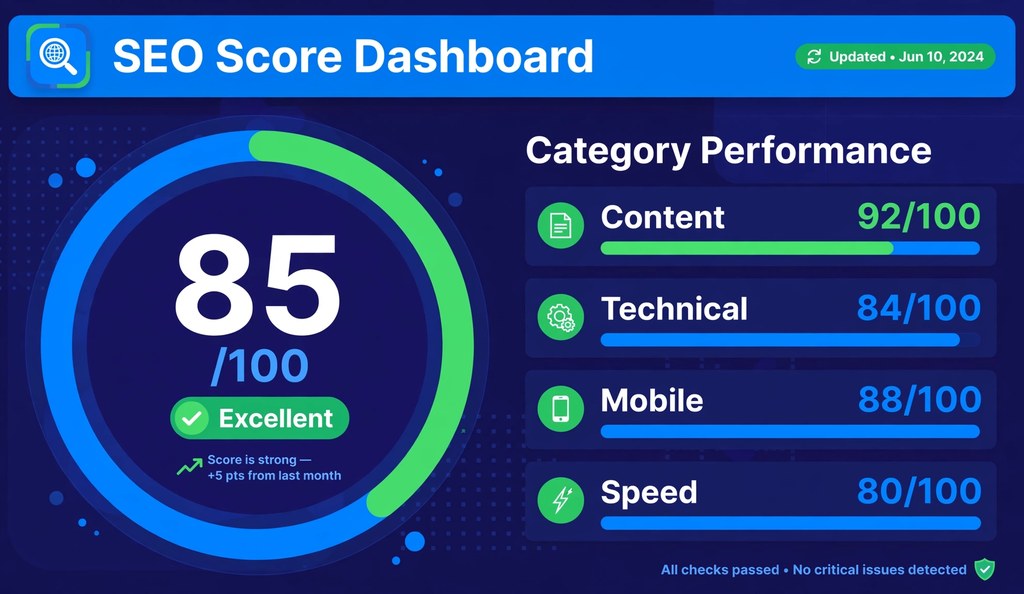
An SEO score check measures how well your website follows search engine optimization best practices. A free SEO score checker scans your page and returns a grade from 0 to 100. Higher scores signal fewer technical errors, stronger content, and better mobile experience. As of October 2026, every major checker uses the same 0 to 100 scale, so scores stay comparable across tools.
Featured Snippet: An SEO score check grades your website from 0 to 100 on technical SEO, content quality, mobile usability, and page speed. Scores of 80 to 100 indicate strong optimization. Scores below 50 signal serious issues that need fixing.
What Is an SEO Score?
An SEO score is a single number from 0 to 100 that summarizes your website’s optimization health. Checkers calculate it by scanning your page against dozens of ranking best practices, then weighting each finding into one grade.
The score combines two kinds of signals. Technical signals cover crawlability, indexation, meta tags, heading structure, and security. User facing signals cover content quality, page speed, mobile usability, and readability. Each checker weights these categories differently, so one page can score 82 on one tool and 76 on another.
Think of the score as a health screening, not a diagnosis. It flags where problems cluster. It never guarantees a ranking position, because Google weighs hundreds of signals that no single checker can see, including backlinks, search intent match, and user behavior.
What Is a Good SEO Score?
A good SEO score falls between 80 and 100. Pages in this range meet the core quality standards that search engines expect.
| Score Band | Meaning | Priority |
|---|---|---|
| 90 to 100 | Excellent. Page meets nearly every best practice. | Maintain with regular rechecks. |
| 80 to 89 | Good. Minor issues remain. | Fix flagged items within weeks. |
| 50 to 79 | Fair. Noticeable problems hold the page back. | Work through issues by severity. |
| 0 to 49 | Poor. Serious technical or content problems exist. | Treat as urgent. Start with crawl and index errors. |
Scores between 50 and 79 describe most of the web. A page in this band usually suffers from a handful of fixable problems, such as missing meta descriptions, slow load times, or thin content. Moving from 65 to 85 typically requires days of focused fixes, not a redesign.
A perfect 100 is rare and unnecessary. Chasing the last five points often costs more effort than the ranking benefit justifies. Aim for 85 plus on important pages, then spend remaining effort on content depth and backlinks.
What Makes Up an SEO Score?
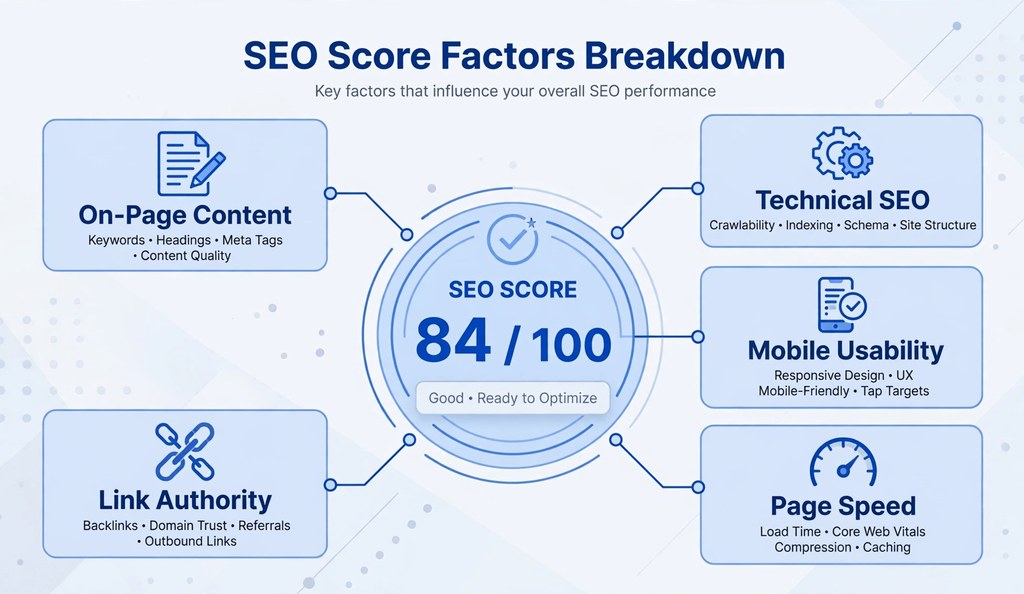
Five factor groups determine your SEO score. Every reputable checker measures all five, though names and weights vary.
On-Page Content Factors
Content factors measure what visitors read. Checkers verify that each page has one H1 heading, a logical H2 and H3 hierarchy, a title tag between 50 and 60 characters, and a meta description between 120 and 160 characters. They count words to flag thin pages, scan for duplicate paragraphs, and check image alt attributes.
Keyword usage matters, but density targets do not exist as official rules. Checkers look for natural topical coverage: the main term in the title, headings, and body, plus related terms throughout. A keyword density checker shows exact occurrence counts so you can spot stuffing or gaps.
Technical SEO Factors
Technical factors measure whether search engines can access and understand the page. Checkers test the robots.txt file for accidental blocks, verify the XML sitemap lists the page, confirm the canonical tag points to the right URL, and check for proper status codes. Broken internal links, redirect chains, and missing HTTPS all reduce the score.
Indexability sits at the foundation. A page blocked by robots.txt or tagged noindex scores near zero on technical health regardless of content quality. Run a free robots.txt checker and a free sitemap checker to verify both files before worrying about finer points.
Mobile Usability Factors
Mobile factors measure the phone experience. Google indexes the mobile version of pages first, so mobile failures hurt more than desktop ones. Checkers verify the viewport meta tag, confirm body text renders at 16 pixels or larger, test tap targets against the 44 by 44 pixel minimum, and check that content fits the screen without horizontal scrolling.
A mobile SEO checker tests these exact points. Mobile issues often come from themes and plugins rather than content, so one template fix can lift scores across hundreds of pages.
Page Speed Factors
Speed factors measure load performance through Core Web Vitals, the three metrics Google defines in its web.dev documentation. Largest Contentful Paint must stay at or under 2.5 seconds. Interaction to Next Paint must stay at or under 200 milliseconds. Cumulative Layout Shift must stay at or under 0.1. Checkers pull these numbers from lab tests or from real user data where available.
Images cause most speed failures. Uncompressed files, missing dimensions, and offscreen images loading eagerly all add seconds. A free website speed tester reports each vital with plain language fixes.
Authority and Link Factors
Some checkers fold link signals into the score. They count referring domains, check for toxic backlinks, and estimate domain level authority from third party indexes. These metrics change slowly, so they matter less for quick wins and more for competitive analysis.
New sites score low here by default. That is normal. Link authority builds over months through content worth citing, not through score optimization tricks.
Does Google Use SEO Scores for Ranking?
No. Google publishes no SEO score and uses no third party score in ranking. Google Search Central documentation describes hundreds of ranking systems but no single website grade.
This distinction matters. A third party score estimates how well a page follows known best practices. Google’s actual ranking weighs those practices alongside signals no checker can measure, such as link authority, query intent match, and user satisfaction. Two pages can hold identical checker scores and rank pages apart.
Use the score as a repair list, not a rank predictor. Fixing flagged issues removes obstacles to ranking. It never guarantees position one, because competitors fix their issues too.
How to Check Your SEO Score
Enter your URL in a free SEO score checker and read the report. The scan takes under a minute for a single page.
Follow these steps:
- Open a free SEO page checker in your browser.
- Paste the full URL of the page, including https.
- Start the scan and wait for the crawler to finish.
- Read the overall score first, then open each category.
- Sort flagged issues by severity and fix critical items first.
- Rescan after fixes to confirm the score moved.
Several free tools cover different depths. HubSpot Website Grader scores performance, mobile readiness, SEO, and security in one report. WooRank grades pages on a 100 point scale built from 70 criteria. SE Ranking reports an overall health score with Core Web Vitals and issue severity levels. Ahrefs Site Audit checks more than 100 technical issues per crawl. Semrush Site Audit lets free accounts crawl up to 100 pages per project.
Google Search Console complements checkers rather than replacing them. It reports no single score, but its Coverage, Core Web Vitals, and Mobile Usability reports confirm whether flagged issues affect real Google traffic. Google PageSpeed Insights scores speed alone on a 0 to 100 scale with field data from actual Chrome users.
Check scores monthly for important pages and after every redesign, migration, or template change. One off checks miss regressions that creep in through plugin updates and content edits.
How to Improve a Low SEO Score
Work the issue list from critical to minor. Each fix below maps to a free tool on this site.

- Unblock crawling first. Verify robots.txt allows Googlebot and the sitemap lists the page. Use the free robots.txt checker and free sitemap checker.
- Fix the title tag and meta description. Keep titles between 50 and 60 characters and descriptions between 120 and 160 characters. Preview rendering with the SERP snippet preview tool.
- Repair the heading structure. Keep exactly one H1, nest H2 and H3 in order, and never skip levels. An on-page SEO analyzer maps the full outline.
- Compress images and add alt text plus width and height attributes. This single step often fixes both speed and layout shift warnings.
- Test load speed and fix the slowest vital first. The free website speed tester names the exact bottleneck.
- Fix mobile tap targets and font sizes. The mobile SEO checker lists each failing element.
- Remove or rewrite duplicate paragraphs. The duplicate content checker finds repeated blocks across pages.
- Strengthen thin content. Pages under 300 words rarely score well. Add the missing subtopics the top ranking pages cover.
- Check heading hierarchy across the whole template with the heading structure analyzer.
- Rescan and record the new score. Track it monthly to catch regressions early.
Most pages climb 15 to 25 points from steps one through six alone. Content depth and link building handle the rest over longer timelines.
Frequently Asked Questions
What is an SEO score check?
An SEO score check scans a web page and grades its optimization from 0 to 100. It tests technical setup, content, mobile usability, and speed, then lists fixes by severity.
How can I check my SEO score for free?
Paste your URL into a free SEO page checker. HubSpot Website Grader, WooRank, and SE Ranking all offer free scans with detailed reports.
What is a good SEO score out of 100?
Scores from 80 to 100 count as good. Scores from 50 to 79 need improvement. Scores below 50 signal serious problems.
Why is my SEO score low?
Common causes include slow load times, missing meta tags, broken links, blocked crawling, thin content, and poor mobile usability. The checker report names the exact issues.
Does a high SEO score guarantee first page rankings?
No. The score measures best practice compliance, not Google’s ranking decision. Backlinks, intent match, and competition decide positions.
How often should I check my SEO score?
Check monthly and after every redesign, migration, or major template change. Regular checks catch regressions from plugin updates and content edits.
Do different SEO checkers give different scores?
Yes. Each tool weights factors differently and runs different test sets. Compare trends within one tool instead of comparing scores across tools.
What affects SEO score the most?
Crawl blocks, missing titles, slow Core Web Vitals, and mobile failures move scores most. Fixing these typically adds 15 to 25 points.
Can I improve my SEO score in one day?
Yes, for technical issues. Title tags, meta descriptions, alt text, and robots.txt fixes take hours. Content depth and backlinks take weeks to months.
Is the SEO score the same as Domain Authority?
No. SEO score grades one page’s optimization health. Domain Authority estimates a whole domain’s ranking strength from its backlink profile.
Does Google penalize low SEO scores?
No. Google has no SEO score to penalize. Low scores correlate with poor rankings because the underlying issues hurt crawling, indexing, or user experience.
Which free SEO score checker is most accurate?
No single checker is most accurate. HubSpot Website Grader, WooRank, and SE Ranking each test different factor sets. Use one consistently and track its trend.
Should I check the SEO score of every page?
Prioritize money pages first. Check homepage, key service pages, and top traffic pages monthly. Audit the full site quarterly with a crawler.
Conclusion
An SEO score check grades your page from 0 to 100 across content, technical setup, mobile usability, speed, and links. Scores of 80 or higher signal solid optimization. Scores below 50 demand urgent fixes to crawling, titles, speed, or mobile experience. Google uses no official score in ranking, so treat third party grades as repair lists rather than rank promises. Check monthly, fix issues by severity, and rescan to confirm progress.
For background on the discipline behind these scores, see this overview of search engine optimization.

