
Most pages that fail on-page SEO do not fail because of keywords. They fail because their headings are a mess: three H1s competing, levels skipped from H2 to H4, bold paragraphs pretending to be structure. Search engines read your headings as the table of contents of your page, and a scrambled table of contents costs you rankings and featured snippets. This guide shows you exactly how to structure H1, H2, and H3 tags for SEO, how to audit what you have, and how to fix a broken hierarchy without touching your design.
The Correct Heading Hierarchy
Think of headings as an outline: one main title, major sections below it, subsections nested inside those. That outline is how Google and your readers understand what your page covers. Here is the hierarchy that works for virtually every page:
| Heading level | Role on the page | How many | Key rule |
|---|---|---|---|
H1 |
Main page title and primary topic | Exactly one | Must match the page’s core topic; never repeat it |
H2 |
Major content sections | Multiple | Each one covers a single subtopic of the H1 |
H3 |
Subsections within an H2 block | As needed | Always nested under a relevant H2 |
H4 to H6 |
Deep nesting for long guides | Rarely needed | Only for H3 blocks needing subsections |
The golden rule: one H1 per page, H2s for major sections, H3s for details inside them. Never skip levels, and never use a heading tag just for looks. Heading tags carry structural meaning, and search engines treat them that way.
Why Heading Structure Still Matters in 2026
Heading structure feeds directly into how Google presents your content today. Featured snippets are frequently pulled from well-headed sections: a clear H2 phrased as a question, followed by a concise answer, is the classic snippet-winning format. When headings map cleanly to the content beneath them, Google can extract and display that content with confidence.
Passage indexing raises the stakes further. Google can rank individual passages from a page, and your headings define where each passage begins and ends. Logical, descriptive headings give every passage a clear topic label; vague or broken ones give Google a blur, and blurred passages rarely rank. Our on-page SEO analyzer guide covers this: headings are one of the first structural signals a scan evaluates.
Then there is accessibility. Screen reader users navigate by jumping between headings. A missing, duplicated, or skipped-level H1 breaks that navigation for real people. Good heading structure is one of the cheapest accessibility wins you can make.
Example of a Correct Heading Structure
Here is the outline of a properly structured guide, stripped down to headings alone:
H1: How to Structure H1, H2, and H3 Tags for SEO
  H2: The Correct Heading Hierarchy
  H2: Why Heading Structure Still Matters in 2026
    H3: Featured snippets
    H3: Passage indexing and accessibility
  H2: H1 vs Title Tag: Best Practice
  H2: Your Heading Audit Checklist
  H2: How to Fix a Broken Heading Hierarchy, Step by Step
  H2: Frequently Asked Questions
    H3: How many H1 tags can a page have?
    H3: Do headings directly affect rankings?
    H3: Should I put keywords in my H2s and H3s?
Three things to notice: every heading sits exactly one level below its parent, each H3 belongs to a specific H2 above it, and the headings read as a summary on their own. If someone only read your headings, they should still understand what the page teaches. That is the test every page should pass.
H1 vs Title Tag: Best Practice
The title tag lives in your page head and appears in search results, browser tabs, and social shares. The H1 is the visible headline on the page. Different jobs, and they do not have to be identical.
Keep the title tag near 60 characters so it displays fully in search results, and lead with your primary keyword, since that is what searchers scan. The H1 can be slightly longer and more descriptive, but keep it under about 70 characters so it reads cleanly on mobile, and match it to the search intent behind the query. Same keyword family, slightly different wording.
One practical warning: some themes output the title tag text as an automatic second H1, or inject an H1 into the header or sidebar. View the page source, search for the h1 tag, and confirm exactly one match. A stray H1 in a widget or logo area should be demoted to a styled paragraph. It takes two minutes and removes a structural contradiction that confuses crawlers.
Your Heading Audit Checklist
Before rewriting anything, run a proper audit. A free on-page SEO analyzer scan maps your H1 to H6 tags automatically, or check manually with this list:
- Exactly one H1. Zero is an error, two or more is a conflict. Confirm in the page source, not just the visual editor.
- No skipped levels. An H4 must never appear under an H2 without an H3 between them. Gaps break the outline.
- Every heading matches the content beneath it. Read each heading, then skim the paragraph below. If they disagree, rewrite one of them.
- No headings used purely for styling. Text that is large and bold only for looks should be a styled paragraph, not an H2.
- Keywords appear naturally. Primary keyword in the H1 and usually one H2; supporting terms in H3s where they fit honestly.
- No two pages share the same H1. Duplicate H1s blur topical boundaries between pages.
- Headings read as an outline. Strip the page to headings alone; if the outline is confusing, the structure is confusing.
Run this SEO website check on your most important pages first: the homepage, your top tool pages, and any guide that drives traffic. Fixing structure on pages that already have authority shows results fastest.
How to Fix a Broken Heading Hierarchy, Step by Step
Found problems? Fix them in this order. Each step takes minutes, and you can check your SEO ranking before and after to measure the effect.
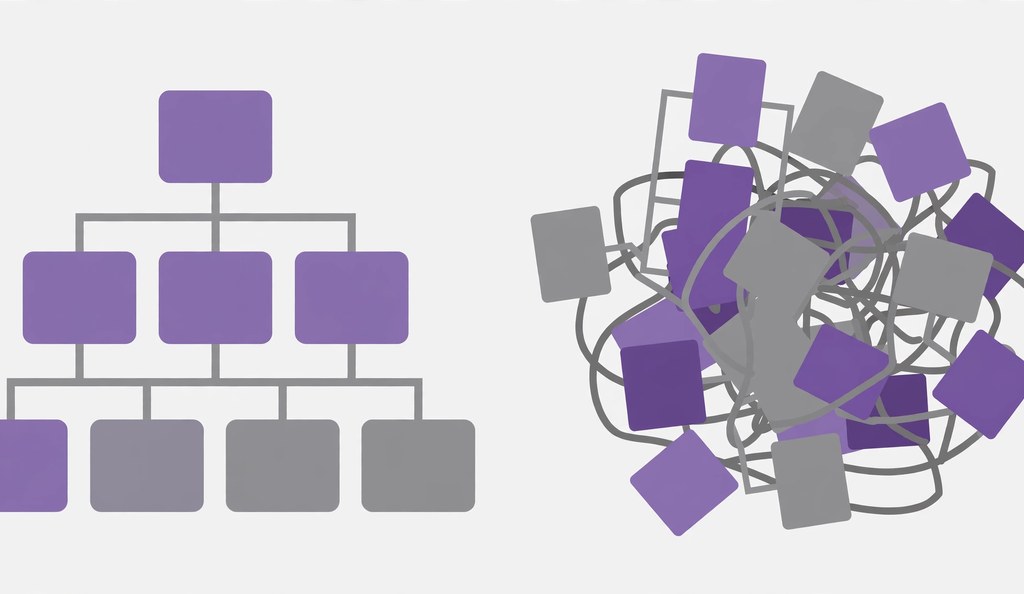
- Map what you have. List every heading from H1 to H6. Broken pages reveal themselves fast: duplicate H1s, H4s floating under H2s, section titles that describe nothing.
- Resolve the H1 conflict. Keep the H1 that best matches the page’s search intent and primary keyword, and demote the rest to H2. A theme-injected H1 in the logo or sidebar should lose its heading tag and be styled with CSS.
- Close the level gaps. Wherever an H4 sits under an H2, add the missing H3: promote the H4, or insert a proper H3 above it that groups it with its siblings. Never jump a level.
- Rewrite vague headings. “Introduction” and “More Info” tell nobody anything. Replace them with specific, keyword-honest labels like “Heading Audit Checklist” or “H1 vs Title Tag Best Practice.”
- Validate and monitor. Re-scan to confirm one H1, no skipped levels, and a readable outline. Run an SEO score check after the fix and again in two to four weeks, and check SEO ranking of website pages to confirm they are moving the right way.
Make this part of your publishing routine. A quick scan with your favorite SEO website checker keeps structural rot from creeping back, and tracking how you check SEO rankings over time shows which pages deserve a heading refresh next.
Frequently Asked Questions
How many H1 tags can a page have?
Exactly one. Multiple H1s split the page’s main-topic signal, forcing search engines and screen readers to guess which headline defines it. Keep the strongest and demote the rest.
Do headings directly affect rankings?
Not as a standalone factor. But headings shape how Google understands your page structure, which passages it indexes, and which sections reach featured snippets. Clean headings support rankings indirectly; messy ones hold pages back.
Should I put keywords in my H2s and H3s?
Include them where they fit naturally: primary keyword in the H1 and usually one H2, related terms in H3s that honestly describe the subsection. Forcing keywords into every heading reads as spammy. Our content quality checker guide covers keeping keyword usage natural across a full article.
What is the difference between the H1 and the title tag?
The title tag appears in search results and browser tabs and should stay near 60 characters. The H1 is the visible on-page headline and can be a little longer. Target the same topic with slightly different wording rather than duplicating it word for word.
How do I find heading errors on my site?
Run a structural scan that maps every H1 to H6 tag and flags a missing H1, duplicates, and skipped levels. An SEO page checker does this automatically, or inspect the page source and read the outline manually. Check the source either way: visual editors can hide template-injected headings.
Do headings matter for accessibility?
Yes. Screen reader users navigate by jumping between headings, so a logical H1 to H2 to H3 order is how they understand your content. A broken hierarchy is a barrier for real visitors, not just an SEO problem.
Final Thoughts
Heading structure is fast and free, and nearly impossible to get wrong once you know the rules: one H1, honest H2 sections, nested H3 details, no skipped levels. Audit your key pages, fix the outline, and let the structure do its quiet work: clearer passages for Google, cleaner snippets, a page that scans beautifully for humans.
Make it a habit: scan the outline before you publish anything new, and whenever you check website SEO ranking performance on older posts, remember a heading refresh is one of the cheapest updates you can make. Small fixes compound into real visibility gains.
For background reading, see Wikipedia’s overview of search engine optimization.

